
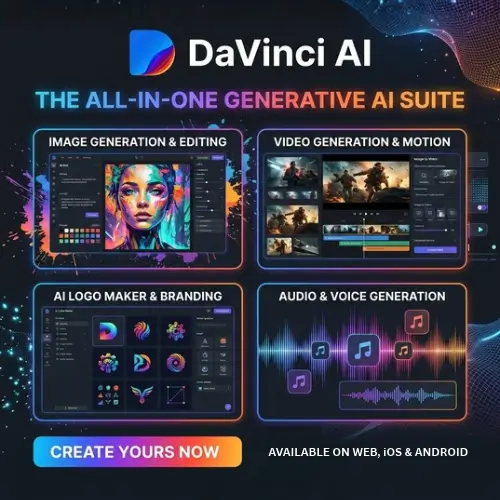
Making videos used to be really hard. You needed a big camera, expensive computer software, and lots of free time. If you made a mistake, you had to start all over again. But today, things are very different. Now we have artificial intelligence, or AI, to help us. One of the coolest and most helpful tools out there right now is DaVinci AI.
If you want to make great videos for Instagram, TikTok, YouTube, or any other social media, this tool can help you a lot. In this article, we will talk about what DaVinci AI is, how it works, and if it is good for you. We will keep things very simple, so anyone can understand it, even if you have never used a video editor before.
Why Video is So Important for Social Media
Before we talk about the tool, let us talk about why we need it. Right now, everyone is watching videos on their phones. When you scroll through Instagram or TikTok, you see short, fun videos everywhere. People pay much more attention to a moving video than they do to a simple picture or a block of text.
If you want to share your ideas, show off a product, or just have fun online, video is the best way to do it. But making good videos takes a lot of work. You have to film it, cut out the boring parts, add music, and put words on the screen. This is exactly where DaVinci AI comes in to save the day.
What is DaVinci AI?
DaVinci AI is a smart computer program. It uses artificial intelligence to help you make and edit videos much faster than a human could. Think of it like a very smart helper sitting next to you. You tell it what you want, and it does the hard work for you.

It is not just for making videos from scratch. It also helps you edit videos you already have. It can add words on the screen automatically, change the background, and even turn a still picture into a moving video. The name “DaVinci” comes from the famous artist and inventor Leonardo da Vinci, which means the tool is built to be very creative and smart.
Top Features of DaVinci AI
There are many things this tool can do. Here are the best features that make it so popular for social media creators.
1. Image to Video Generation
This is one of the most magical features. Sometimes you have a really nice picture, but you want it to move. With the image-to-video feature, you just upload your picture. The AI looks at the picture and guesses how it should move. If you upload a picture of a dog, the AI can make the dog wag its tail or run. If you upload a picture of the ocean, it can make the waves move. It is a great way to bring still photos to life for your social media posts.
2. Automatic Captions
Have you ever watched a video on your phone with the sound off? Most people do this when they are in public. If your video does not have words on the screen, they will just scroll past it. DaVinci AI listens to your video and automatically types out the words. It puts them on the screen in a cool, easy-to-read style. You do not have to type a single word yourself.

3. Smart Background Removal
Usually, if you want to change the background of your video, you need a big green screen and special lights. DaVinci AI does not need any of that. The AI can look at your video, figure out where you are, and cut you out of the background. You can then put yourself on a beach, in space, or in a cool studio, all without leaving your bedroom.
4. Auto Reframe for Social Media
Different social media apps like different video shapes. YouTube likes wide, horizontal videos. TikTok and Instagram Reels like tall, vertical videos. If you film a wide video, DaVinci AI can automatically cut it and move it to fit a tall phone screen. It keeps you in the center of the frame so you do not get cut off.
5. Script and Idea Help
Sometimes the hardest part of making a video is just thinking of what to say. If you are stuck, you can ask DaVinci AI for help. You tell it your topic, and it will write a short script for you. It can also give you a list of catchy titles to make people want to click on your video.
How to Make Your First Video
If you are new to this, making your first video might feel a little scary. But with DaVinci AI, it is actually very easy. Here is a simple step-by-step guide to help you start.
Step 1: Pick your idea. Think about what you want to show. Is it a funny story, a quick tip, or a cool picture?
Step 2: Gather your media. Upload the video clips or pictures you want to use into the tool.
Step 3: Let AI do the work. If you are using the image-to-video feature, pick your picture and tell the AI how you want it to move. If you are editing a video, let the AI cut out the silent or boring parts.
Step 4: Add the finishing touches. Turn on the auto-captions so people can read along. Pick a nice background track from their music library.
Step 5: Export and share. Click the export button. The tool will save the video to your computer or phone. Now you can upload it to your favorite social media app.
Tips for Making High-Quality Videos
Since you want to create good quality videos for social media, here are a few simple tips to keep in mind while using DaVinci AI.
- First, always make sure your original picture or video is clear. If the starting picture is blurry, the AI will have a hard time making it look good.
- Second, keep your videos short. People on social media have very short attention spans. Try to keep your videos under 30 seconds if you can.
- Third, use a strong “hook.” The first three seconds of your video are the most important. Start with something exciting or ask a question right away so people do not scroll past.
- Finally, do not use too many crazy effects. It is tempting to use every cool filter the AI has, but keeping it simple usually looks much better and more professional.
Pricing of DaVinci AI
One of the best things about DaVinci AI is that it has options for every budget. Whether you are just playing around or running a big business, there is a plan for you. Here is a simple table to show you the pricing.
| Plan Name | Price | What You Get |
|---|---|---|
| Trial Plan | $1.99 / 7-day Trial | Basic editing, limited image-to-video generations, and standard export quality. Great for beginners. or test the platform. |
| Pro Plan | $19.99 / month | No watermarks, HD video exports, unlimited auto-captions, and more image-to-video credits. Perfect for personal social media. |
| Max Plan | $39.99 / month | Everything in Creator, plus 4K exports, priority rendering (faster saving), and advanced AI background removal tools. |
| Ultimate Plan | $99.99 / month | Built for groups. Includes multiple user logins, shared project folders, and a central billing dashboard for businesses. |
| Creator Plan | $199.99 / Month | Best for Serious Creators. Create pro level social media content, Ads and much more. |
Annual Pricing (60% OFF)
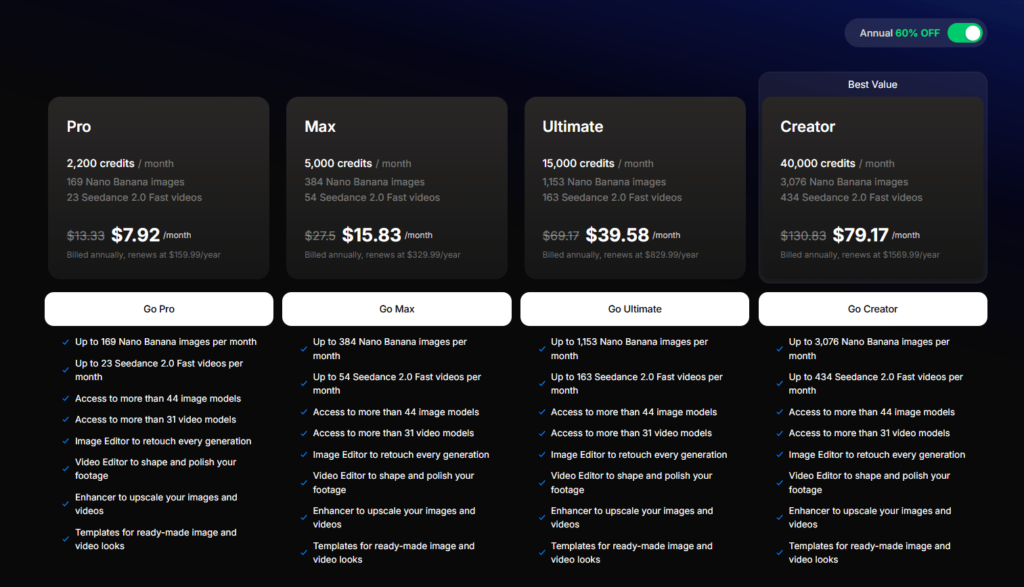
Note: Prices can change, and they often run sales during holidays, so it is always good to check their official website for the latest deals.
Pros and Cons
No tool is perfect. Here is a quick look at the good and bad things about DaVinci AI.
The Good Things (Pros):
- It is very easy to learn, even for complete beginners.
- The image-to-video feature is fantastic for making still pictures look alive.
- Auto-captions save you hours of typing work.
- It has a free plan so you can test it before paying.
The Bad Things (Cons):
- The free plan leaves a watermark on your video, which you might not want for professional work.
- Sometimes the AI makes small mistakes when cutting out backgrounds, so you might need to fix it by hand.
- Rendering (saving) very long videos can take a little bit of time.
Final Thought
Making videos for social media does not have to be a stressful job. DaVinci AI takes the hard, boring parts of video editing and does them for you. From turning a simple picture into a moving video to automatically adding captions, it gives you more time to just be creative. If you are a student, a beginner, or just someone who wants to make cool videos for Instagram and TikTok without spending hours learning complicated software, DaVinci AI is a wonderful choice. It is simple, it is smart, and it gets the job done.
Alternatives to DaVinci AI
Runway ML
Runway is a very popular AI tool that is great for making videos from text or images. It has lots of cool visual effects and is very easy to use for beginners who want to make artistic videos.
Pika Labs
Pika Labs is an excellent choice if you want to turn text or pictures into short, fun video clips. It is very fast and works great for making quick, funny, or creative clips for social media.
HeyGen
HeyGen is the best alternative if you want to make videos with talking AI avatars. You just type your script, and a realistic-looking digital person will say the words for you, which is great for educational or business videos.
InVideo AI
InVideo AI is perfect if you want the tool to do everything for you. You just give it a topic, and it will write the script, find the video clips, add a voiceover, and edit the whole video automatically.
CapCut
CapCut is a very famous free video editing app that has added lots of AI features. It is amazing for adding auto-captions, removing backgrounds, and applying trendy effects directly on your phone.
Frequently Asked Questions
Do I need a powerful computer to use DaVinci AI?
No, you do not. Because the AI does the heavy lifting on their own servers, you can use it on a basic laptop or even a tablet with a good internet connection.
Can I use the videos I make for my business?
Yes. As long as you are on a paid plan (Creator, Pro, or Team), you own the videos you make. You can use them for your business, ads, or social media without any worries.
Is the image-to-video feature realistic?
It is getting better every day. For simple movements like water flowing or clouds moving, it looks very real. For very complex actions, it might look a little bit like a cartoon, but it is still very cool.



