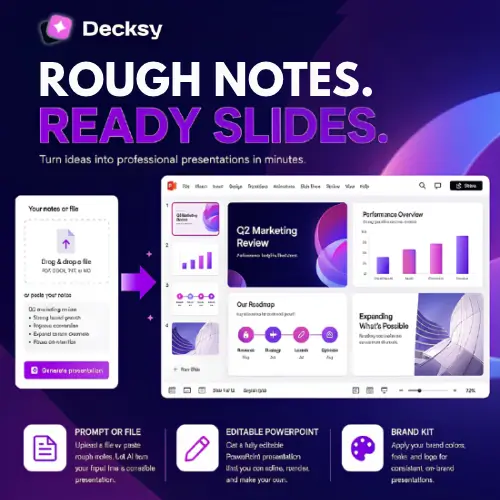
Let’s be honest. Making a presentation is rarely the fun part of any project. You have the ideas, the research, and the notes, but turning all of that into a clean, professional slide deck takes hours. You end up fighting with text boxes, aligning images, and wondering why the chart looks nothing like what you imagined.
Decksy AI is a tool built to solve exactly that problem. It’s an online presentation maker that takes your raw material and turns it into a finished deck. You don’t need design skills. You don’t need to start from a blank slide. You just give it something to work with, and it handles the rest.
What Exactly Does Decksy AI Do?
At its core, Decksy AI is a browser-based tool that converts text into slides. You can start with a simple topic, a rough outline, or even a full document you’ve already written. The tool reads your material, figures out the best way to organize it, and builds a presentation for you .
The important thing here is that the output is not a bunch of flat images. You get a real, editable PowerPoint file. Every text box, shape, icon, and chart can be clicked, moved, and changed. This matters because a lot of AI presentation tools just give you a picture of a slide. That’s useless if you need to fix a typo or update a number. Decksy AI gives you actual working files .
You can upload files in several formats, including Word, PDF, Excel, Markdown, and plain text. It can even take an old, messy presentation and redesign it for you. So if you have a deck from two years ago that looks dated, Decksy AI can read it and give it a fresh look .
How the Process Works
Using Decksy AI is pretty straightforward. You don’t need to read a manual.
First, you give it your content. This can be as simple as typing “Create a presentation about climate change for high school students” or as detailed as uploading a ten-page report. The tool analyzes what you’ve given it and starts building a structure.
Second, you can adjust the style and length. You can choose the tone, whether it should be formal, casual, or persuasive. You can pick a design style and decide how many slides you want, anywhere from five to twenty-five .
Third, you review and edit. Decksy generates the slides, and you can go through them. If one slide doesn’t look right, you can regenerate just that slide without starting over . This is a small feature but a huge time-saver.
Finally, you export. You get a PowerPoint file that you can open in PowerPoint, Google Slides, or Keynote. You can also export to PDF if you need a fixed version.
The Features That Actually Matter
Not every feature on a tool’s website is useful in real life. Here are the ones that make a difference for regular users.
Brand Kit and Slide Master. If you’re making presentations for a company, consistency is important. Decksy lets you store your logos, colors, and fonts in a Brand Kit. When it generates slides, it uses those settings automatically. The Slide Master support means that if you add a new slide later in PowerPoint, it will still match the rest of the deck . This is the kind of detail that saves you from embarrassing mismatched fonts in a client meeting.
Editable, Data-Linked Charts. This is a big one. If you’re making a quarterly report or a financial presentation, you know the pain of updating a chart. You change the numbers in your spreadsheet, but the chart in your slide is just a picture. You have to rebuild it. Decksy creates charts that stay connected to their data. You can click the chart and update the numbers directly . For anyone who makes recurring business decks, this alone is worth considering.
Animations and Transitions. You can add these inside Decksy AI, and they carry over when you export. It’s not a make-or-break feature, but it’s nice to have everything in one place.
Resizing. You can switch between widescreen, standard, and vertical formats. This is handy if you need the same content for a projector and for a social media post.
Where Decksy Shines (and Where It Doesn’t)
Decksy is at its best when you already have good material and you just need help turning it into slides. If you have a research paper, a project report, or a set of meeting notes, Decksy can organize that chaos into something coherent. It’s also great for creating a first draft. You can generate a full deck in minutes, then spend your time refining the content rather than building the layout from scratch.
It’s less useful if you have no content at all. The AI can generate ideas, but it works best when it has something real to work with. It’s also not a replacement for human judgment. You still need to check the slides, make sure the flow makes sense, and verify any numbers or claims.
Privacy is another thing to keep in mind. Decksy AI uses third-party AI providers like OpenAI and Gemini to process your prompts. The company says it doesn’t use your data to train public models, but it also warns that submitting highly confidential information to any third-party AI system carries risks . If you’re working with sensitive company data, you should check the current terms before uploading.
Pricing
Decksy offers a free way to try the tool, which is good for testing whether it fits your workflow. Paid plans are available on monthly and annual subscriptions. The exact limits and features can change, so it’s worth checking the official pricing page before you commit.
| Plan | What You Get |
|---|---|
| Free | Try the generator with basic limits |
| Monthly Subscription | Full features, higher limits, brand kits, exports |
| Annual Subscription | Same as monthly but at a lower monthly cost |
Some sources mention a short-term trial for a couple of dollars and an unlimited plan around $10 per month with annual billing . However, pricing pages change often. Always check the official site for the current numbers.
Final Thoughts
Decksy AI is a solid choice for anyone who makes presentations regularly and wants to cut down the busywork. It won’t replace your judgment or your knowledge of the topic, but it will save you from spending hours dragging boxes around. The editable PowerPoint output and the data-linked charts are the standout features. If you already have content and need a clean first draft, it’s worth a try. Just be mindful of what you upload, and check the pricing before you rely on a specific feature.
Alternatives to Decksy AI
Decktopus. An AI presentation maker that focuses on branded decks and also offers coaching for your actual delivery. It’s a good pick if you want help with both the slides and the speaking part.
Gamma. A card-based presentation and document tool that works well for web-friendly content. Choose this if you don’t need a traditional PowerPoint file and want something that adapts to different screen sizes.
SlidesAI. A tool that lives inside Google Slides and turns text into slides without leaving your workspace. Ideal for teams that already use Google Workspace and want a simple, integrated workflow.
OKKSlides. Builds PowerPoint decks from your source material with an iterative editing process. It’s a better fit if you want more control over the structure and fewer template restrictions.