Creating quality content regularly can take a lot of time, especially when you have to write blog posts, emails, advertisements, product descriptions, and social media captions. Rytr is an AI-powered writing assistant that helps you create content faster without spending hours thinking about every sentence.
Whether you are a blogger, freelancer, marketer, business owner, or content creator, Rytr can help you turn simple ideas into ready-to-edit drafts. It offers different writing tools, tones, and languages to support various content needs. It also includes tools for improving existing text and creating messages for everyday communication.
In this review, we will explore Rytr’s features, pricing, benefits, limitations, and alternatives to help you decide whether it is the right AI writing tool for your work.
What Is Rytr?
Rytr is an AI-powered platform designed to help individuals and businesses create written content and manage communication more efficiently. It can generate blog ideas, marketing copy, emails, social media posts, product descriptions, and other types of text.
The platform offers more than 40 writing use cases, multiple writing tones, and support for more than 30 languages, depending on the available plan. Users can provide a topic or a short description, select the type of content they want, and let the AI generate a draft.
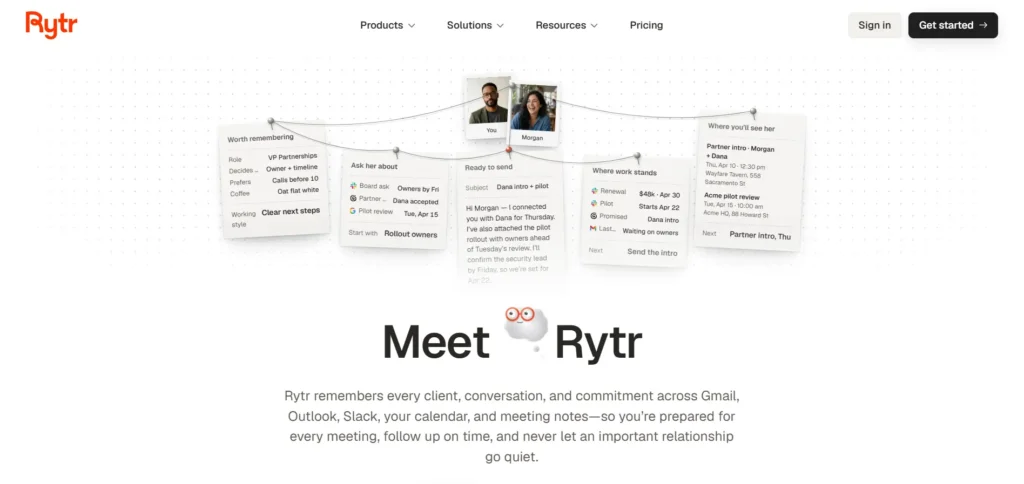
Rytr also provides writing and editing assistance, along with a browser extension that makes it easier to use its tools while working online. Its newer platform also introduces communication management features through its Engage product, which helps users keep track of relationships, conversations, and follow-ups.
The main idea behind Rytr is simple: help users spend less time writing routine content and more time focusing on important work.
Key Features of Rytr
Rytr offers several useful features for people who regularly create written content. Here are some of the main features worth exploring.
1. AI-Powered Content Creation
One of Rytr’s biggest advantages is its AI content generation feature. You do not need to start every document with a blank page. Simply provide a topic, explain what you want to write, and let the platform generate a starting draft.
You can use this feature for:
- Blog posts and article ideas
- Product descriptions
- Website content
- Email messages
- Facebook and Instagram captions
- Advertising copy
- Business ideas and taglines
- Video descriptions
This feature is especially useful when you have several writing tasks to complete and need a quick starting point.
2. More Than 40 Writing Use Cases
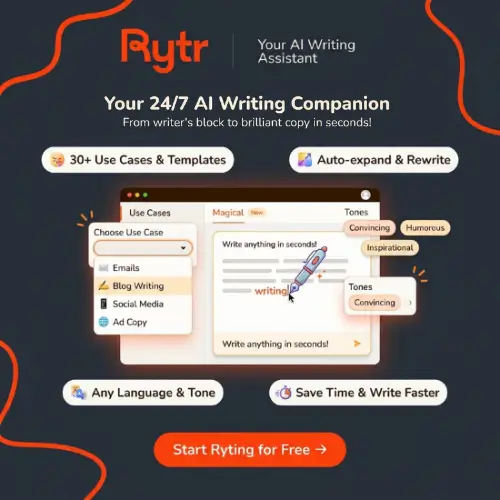
Rytr offers more than 40 writing use cases to help users create different types of content. Instead of using the same writing format for everything, you can select a suitable use case based on your requirements.
For example, a blogger can use blog-related templates, while an online store owner can create product descriptions. Similarly, marketers can generate advertising content and email campaigns.
These ready-made options make the platform easier to use, particularly for beginners who are not familiar with writing detailed AI prompts.
3. Multiple Writing Tones
The tone of your writing matters. A promotional email should not sound like an academic article, and a social media caption should not sound like a formal business report.
Rytr offers different writing tones to help users adjust how their content sounds.
Some useful tone options include:
- Professional
- Casual
- Friendly
- Convincing
- Informative
- Humorous
- Enthusiastic
- Inspirational
You can choose a suitable tone depending on your audience and the type of content you are creating.
4. Support for Multiple Languages
Rytr supports content creation in more than 30 languages, depending on the plan and available features.
This is helpful for businesses and content creators who want to reach audiences in different countries.
For example, you can use AI-generated content for English-language websites, create Hindi drafts for Indian readers, or prepare content for other supported language audiences.
However, AI-generated translations and multilingual content should always be checked for grammar, meaning, and natural language flow before publishing.
5. Rich-Text Editor
Creating content is only one part of writing. Editing and improving that content is equally important.
Rytr provides an editor that helps users work on their generated text. You can rewrite sentences, shorten paragraphs, improve wording, and make your content easier to understand.
This is particularly useful when the first AI-generated draft does not match your expectations.
Instead of copying your content into several different applications, you can use the available editing options to improve it within the platform.
6. Plagiarism Checker
Originality is important when publishing content online. Rytr has offered a plagiarism-checking feature that allows users to check whether their text matches existing online content.
This can be useful for bloggers, students, freelancers, and marketing teams.
However, remember that passing a plagiarism check does not automatically mean that your content is factually correct, well-written, or suitable for publication. Always review the final draft yourself.
Plagiarism-check availability and monthly limits depend on the subscription offering.
7. Browser Extension
Rytr also offers a browser extension that makes its writing assistance accessible while working on different websites.
You can use it to help write or improve content without constantly switching between browser tabs.
For example, it can be useful when:
- Writing professional emails.
- Preparing social media updates.
- Improving website content.
- Rewriting sentences.
- Creating short marketing messages.
This feature can save time for people who complete most of their work through a web browser.
8. SEO Content Assistance
Writing content is not enough if you want people to find it through search engines. You also need to consider keywords, headings, readability, and search intent.
Rytr has included SEO-related assistance in its writing workflow, helping users prepare content around specific topics and keywords.
You can use AI to generate article ideas, write introductions, create headings, and prepare descriptions for your pages.
Keep in mind that AI writing assistance is not a replacement for proper keyword research or a complete SEO strategy. You should still check search intent, keyword competition, and the quality of your content before publishing.
9. Project Management and Organization
If you create content for multiple websites or clients, keeping everything organized can become difficult.
Rytr has offered project organization features that help users manage their writing work in one place.
This can be useful for freelancers, agencies, and businesses working on multiple content projects.
You can keep your drafts organized, access previous work, and manage content more conveniently instead of saving everything in separate documents.
10. Communication Management with Engage
One important development in Rytr’s current platform is its Engage offering.
While its Create feature focuses on generating written content, Engage focuses on managing professional relationships and communication.
It can help users keep track of conversations, remember commitments, prepare for meetings, and draft follow-up messages.
This is particularly useful for consultants, freelancers, founders, and professionals who communicate with clients regularly.
It gives Rytr a broader purpose than simply generating blog posts and marketing copy.
Who Should Use Rytr?
Rytr is designed for people who regularly write content or communicate with customers, clients, and business partners.
Here are some users who can benefit from this platform.
1. Bloggers and Website Owners
Bloggers can use Rytr to generate article ideas, introductions, outlines, headings, and short content sections. It can help reduce the time spent planning and preparing blog posts.
Digital marketers can use Rytr to create advertising copy, promotional messages, email campaigns, and social media content. Different writing tones can help them prepare content for different audiences.
3. Freelance Writers
Freelancers who work with multiple clients can use Rytr to create initial drafts and improve existing content. It can also help with routine writing tasks that do not require extensive research.
4. Small Business Owners
Small business owners often need website descriptions, product details, promotional emails, and customer messages. Rytr can help them prepare these materials without hiring a writer for every small task.
Social media managers can use Rytr to create captions, promotional posts, and content ideas for different platforms. It can be useful when managing multiple social media accounts.
6. Consultants and Professionals
People who regularly communicate with customers and business partners can also benefit from Rytr’s Engage features. These tools help organize relationships and prepare follow-up messages.
Examples of What You Can Create with Rytr
Here are some practical ways to use Rytr in your daily work:
| Content type | How Rytr can help |
|---|---|
| Blog posts | Generate ideas, introductions, and article drafts |
| Emails | Write professional and promotional emails |
| Social media | Create captions and engaging posts |
| Product descriptions | Prepare descriptions for online stores |
| Advertisements | Generate marketing and advertising copy |
| Website content | Write page descriptions and introductions |
| Business communication | Prepare replies and follow-up messages |
| Taglines | Generate catchy business slogans |
| Video descriptions | Create YouTube descriptions and summaries |
| Creative writing | Generate story ideas and creative drafts |
Rytr Pricing and Plans
Rytr offers free and paid subscription plans. Its current pricing page lists four options: Free, Lite, Personal, and Pro.
The following prices are displayed on the official website under monthly billing.
| Plan | Monthly price | Main features |
|---|---|---|
| Free | $0 | 10,000 characters per month, 40+ writing use cases, 30+ languages |
| Lite | $9/month | Everything in Free with unlimited content creation |
| Personal | $19/month | Lite features, 2 connected sources, 250 active relationships and 250 Engage actions |
| Pro | $49/month | All connected sources, 1,000 active relationships, 2,000 Engage actions, custom use cases |
A few things to know about the pricing:
- Free: Suitable for testing Rytr and completing occasional writing tasks.
- Lite: A good option for individuals who need unlimited content generation.
- Personal: Designed for everyday communication and users who need more relationship management features.
- Pro: Better suited to professionals who manage several relationships and communication workflows.
Rytr also offers yearly billing with a 20% saving compared with monthly billing. The final amount may vary depending on your billing selection, currency conversion, and applicable taxes.
Pros and Cons of Rytr
Every AI writing tool has advantages and limitations. Here are some important things to consider before choosing Rytr.
Pros
- Easy-to-use interface suitable for beginners.
- More than 40 writing use cases.
- Supports more than 30 languages.
- Multiple writing tones for different content requirements.
- Helps generate content quickly.
- Useful editing and rewriting assistance.
- Browser extension for convenient access.
- Free plan available.
- Offers both content creation and communication management features.
- Affordable entry-level paid plan.
Cons
- AI-generated content may require considerable editing.
- Not the best choice for creating complete, research-heavy long-form articles without human involvement.
- Generated information may sometimes be inaccurate or outdated.
- Advanced features require paid subscriptions.
- Monthly character limits apply to the free plan.
- The quality of the output depends heavily on the instructions you provide.
- It cannot completely replace professional writers, editors, or SEO specialists.
Is Rytr Good for SEO Content Writing?
Rytr can be useful for SEO content writing, especially when you need help generating article ideas, introductions, headings, product descriptions, and short content sections.
For example, if you want to write an article about the best AI video generators, you can use Rytr to generate an outline and create an initial introduction. You can then improve the article with your own research, examples, and experience.
However, you should not depend entirely on AI-generated content for SEO.
A good SEO article needs more than just words. It should answer the reader’s questions, provide useful information, include accurate facts, and offer something valuable that other articles may not provide.
My recommendation is to use Rytr as a writing assistant rather than an automatic article-publishing tool.
Rytr vs Other AI Writing Tools
There are many AI writing assistants available today. However, they do not all focus on the same things.
| Tool | Best known for |
|---|---|
| Rytr | Affordable AI writing and communication assistance |
| Jasper AI | Marketing content and brand-focused writing |
| Copy.ai | Marketing copy and AI-powered workflows |
| Writesonic | AI content creation and SEO workflows |
| Grammarly | Grammar, spelling, and writing improvement |
| QuillBot | Paraphrasing, rewriting, and summarizing |
If you mainly need an affordable writing assistant, Rytr is worth considering. If you need advanced marketing workflows or more specialized writing features, comparing other platforms may be worthwhile.
Is Rytr Worth It?
Yes, Rytr is worth considering if you regularly create short-form content, marketing copy, emails, social media posts, or website descriptions.
Its biggest advantage is convenience. You can use different writing templates and tones to create a starting draft without spending too much time on routine writing tasks.
The free plan is a good way to test the platform before purchasing a subscription. If you need more content generation, the Lite plan provides unlimited character generation according to the current pricing page.
However, if your main requirement is producing detailed, research-heavy articles, you may need additional tools and manual editing to achieve the quality you want.
Overall, Rytr is a useful option for freelancers, bloggers, marketers, and small business owners who want an affordable AI writing assistant.
Final Thoughts
Rytr is a practical AI writing platform that makes everyday content creation easier. From blog ideas and product descriptions to emails and marketing copy, it offers several tools that can save time and improve your writing workflow.
Its simple interface, multiple writing use cases, language support, and affordable entry-level subscription make it suitable for beginners as well as experienced content creators.
The newer Engage features also make it interesting for professionals who want help managing business communication and follow-ups.
However, remember that AI-generated content is not always ready to publish. Review the information, improve the writing, and add your own experience before using it.
If you are looking for an affordable tool to assist with everyday writing, Rytr is definitely worth trying.
Alternatives to Rytr
If Rytr does not meet your requirements, here are some other AI writing tools worth exploring. These alternatives offer similar content-generation, rewriting, or marketing-writing capabilities.
1. Jasper AI
Jasper helps users create blog content, marketing campaigns, product descriptions, and brand-focused copy. It is particularly useful for marketing teams and businesses.
2. Copy.ai
Copy.ai offers AI-powered writing tools for advertisements, emails, social media, and marketing content. It is also useful for automating different business workflows.
3. Writesonic
Writesonic helps users generate articles, marketing copy, website content, and SEO-focused material. It is a useful option for bloggers and digital marketers.
4. QuillBot
QuillBot is popular for paraphrasing, rewriting, grammar checking, and summarizing. It is particularly useful for improving existing text.
5. Grammarly
Grammarly helps users improve grammar, spelling, clarity, and tone. It is a good choice for people who want to make their existing writing more professional.
Frequently Asked Questions (FAQs)
1. Is Rytr free to use?
Yes. Rytr offers a free plan with 10,000 characters per month. You can use it to explore its writing features before upgrading to a paid subscription.
2. Is Rytr good for blog writing?
Yes. Rytr can help generate blog ideas, introductions, outlines, and article drafts. However, longer articles usually require additional research, editing, and fact-checking.
3. Does Rytr support multiple languages?
Yes. Rytr supports more than 30 languages, depending on the available plan and features.
4. Can Rytr write social media posts?
Yes. You can use its writing tools to generate captions, promotional messages, and social media content for different platforms.
5. Does Rytr have a plagiarism checker?
Rytr has offered a plagiarism checker for checking text originality. Availability and usage limits depend on the subscription plan.
6. Is Rytr suitable for beginners?
Yes. Its simple interface and ready-made writing use cases make it easy for beginners to start creating content without advanced writing skills.
7. Can I use Rytr for commercial purposes?
Rytr is designed for business and professional writing needs. However, you should review its current terms and subscription conditions to understand the applicable content usage rights.
8. What are the best alternatives to Rytr?
Some popular alternatives include Jasper AI, Copy.ai, Writesonic, QuillBot, and Grammarly. The best option depends on whether you need content generation, marketing copy, paraphrasing, or grammar improvement.