
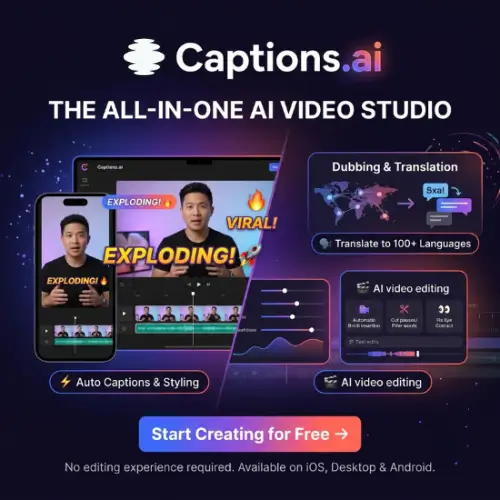
Have you ever spent hours editing a simple video for TikTok or Instagram? You cut the boring parts, add captions, fix your voice, and by the time you upload, you are tired. That is exactly the problem Captions.ai wants to solve. Instead of you doing all the work, this app uses AI to do the editing for you. You record or upload a video, tap a button, and it gives you a finished clip with captions, zooms, music, and even B-roll. In this article, I will explain what Captions.ai does, how much it costs, and whether it is worth your time.
What is Captions.ai?
Captions is an AI video editor and generator. It works on your phone (iPhone and Android), on your Mac, and in your web browser . It was made for people who talk to the camera—think creators, podcasters, coaches, and small business owners. The main idea is simple: you should not need to learn a complicated timeline editor just to make a good video.

The company behind it, NOCAP, Inc., built Captions around a few smart tools. The biggest one is AI Edit. You upload a video, and the AI cuts out the silence, adds captions with cool animations, zooms in at the right moments, and even puts music in the background. You can still change things afterward if you want, but you do not have to start from scratch .
Another popular feature is Eye Contact. If you look away from the camera while reading a script, Captions.ai can fix your eyes so it looks like you are staring right into the lens. That is a huge help for people who feel awkward on camera .
Key Features That Make It Useful
One-Tap AI Editing
This is the heart of Captions. You do not need to drag clips around. Just upload your raw footage, tap AI Edit, and wait. The app finds the good parts, removes the “ums” and long pauses, and builds a video that is ready to post. You can pick from different styles to match your vibe .
Auto Captions and Animated Styles
Captions.ai are not just text on screen. They pop, change colors, and highlight words as you speak. This keeps viewers watching even when they have their sound off. The captions are accurate, and you can change the font, color, and animation style easily .
AI Dubbing with Lip Sync
If you want to reach people in other countries, this feature is gold. Captions can translate your video into another language and make it sound like you—your own voice, not a robot. Even better, it matches your lip movements to the new audio so the video does not look weird .
AI Avatars and Digital Twins
Do you want to make videos without filming? You can create a digital twin of yourself or use an AI actor. You type a script, and the avatar says it on screen. This is useful for making quick updates or ads when you do not feel like dressing up and turning on the camera .
Clips: Long Video to Shorts
If you have a long podcast or webinar, Captions can chop it into short, vertical clips for TikTok, Reels, and Shorts. The AI finds the moments that are most likely to go viral and adds captions automatically .
How Much Does Captions Cost?
Captions.ai has a free plan, but it is very limited. You get some basic editing tools, but you do not get AI credits. To use the good stuff—AI Edit, avatars, dubbing—you need a paid plan. Here is the pricing as of late 2026 .
| Plan | Price (Monthly) | Credits Per Month | Who It Is For |
|---|---|---|---|
| Free | $0 | 60–200 lifetime credits (no refresh) | Testing the app and basic trimming |
| Lite (Android only) | $4.99 | N/A | Simple manual editing on an Android phone |
| Basic (formerly Pro) | $9.99 | 200 | Light AI use and captions |
| Max | $24.99 | 500 | Serious creators who need AI Edit, avatars, and Clips |
| Frontier (formerly Scale) | $69.99 | 1,400 | Power users and small teams |
| Frontier 2x | $139.99 | 2,800 | High-volume creators |
| Frontier 4x | $279.99 | 5,600 | Agencies and heavy production |
A quick note on credits: Every time you use an AI feature—like generating a video, making an image, or running AI Edit—it uses up credits. For example, a 4-second AI video might cost 64 credits. So if you are on the Max plan with 500 credits, you cannot generate hours of AI footage. You need to plan your usage . Also, unused credits can roll over for up to two months, which is nice .
What I Liked and What I Did Not
I Like:
Captions.ai is genuinely fast. If you hate editing, this app feels like a cheat code. The Eye Contact feature works surprisingly well, and the captions look professional without any effort. For phone-first creators, it is one of the smoothest experiences out there .
I Really Don’t Like:
The free plan is too limited to really learn the app. You almost have to pay to see if it works for you. Also, the credit system can be confusing. You might burn through your monthly credits faster than you expect if you use video generation a lot. And while the AI is good, it is not perfect—sometimes it cuts at odd moments or picks music that does not fit. You still need to review the final video before posting .
Final Thought
Captions.ai is not trying to be a professional Hollywood editor. It is trying to help you make good, watchable videos quickly, especially for social media. If you are a creator who talks on camera and wants to stop wasting hours in a timeline, Captions is worth trying. Just go in with realistic expectations: it is a helper, not a magic wand. Start with the Max plan for a month, see how many credits you actually use, and then decide if you need to go bigger.
Video Overview
Alternatives to Captions.ai
If Captions does not feel right, here are a few other tools that do similar things.
| Alternative | What It Does |
|---|---|
| CapCut | A free, very popular editor with auto-captions and templates. It is great if you like building edits clip by clip and want a huge library of trending effects . |
| Descript | Lets you edit video by editing the text transcript. It is perfect for podcasters and people who prefer a desktop workspace over a phone app . |
| OpusClip | Focuses on turning long videos (like podcasts or webinars) into many short clips. It finds the highlights for you and adds captions, but it is less about recording and more about repurposing . |
| Submagic | A web tool that adds captions, zooms, and B-roll to short clips. It is simple and fast if you already have a clip and just want to make it look better . |
| VEED | A browser-based editor with strong subtitle tools and a clean interface. It is a good middle ground if you want more control than Captions but do not want to install software . |
Captions.ai FAQs
Is Captions.ai free to use?
There is a free plan, but it’s quite limited. You get basic editing tools like trimming and transitions, but no AI credits for features like AI Edit, avatars, or dubbing. To actually use the AI features, you need a paid plan starting at $24.99/month.
How do credits work?
Credits are used every time you generate something with AI. They do not roll over to the next month—unused credits expire at the end of each billing cycle . Once you run out, AI features stop working until your next billing date. You can’t buy extra credits on standard plans; you have to upgrade your plan instead.
What happens if I run out of credits?
For AI Creator, videos still generate but go into a slower queue (up to 1 hour wait). For AI Edit and other AI features, they become unavailable until your credits reset or you upgrade .
Can I use Captions videos for commercial purposes?
Yes. Videos made with AI Creator can be used commercially according to their Terms and Conditions .
What languages does Captions support?
Captions supports 100+ languages for captions and translation, including English, Spanish, French, German, Chinese, Japanese, Korean, Hindi, Arabic, and many more .
Are there video length limits?
Yes. For captions in the same language, the limit is 10 minutes on iOS/Desktop and 5 minutes on Android. For translation or dubbing, it’s 5 minutes across all platforms .
What platforms does Captions work on?
Captions works on iOS, Android, and Web. Note that Captions Desktop was shut down after September 30, 2026—users had to move to the web version and rebuild their projects manually .
Can I cancel my subscription easily?
Cancellation depends on where you bought it. If through Apple, you cancel in Apple’s settings. If through Stripe (web), you cancel in the Stripe billing portal. Captions itself cannot cancel for you . Some users have complained about difficulty cancelling and unexpected charges .
Does Captions add a watermark to free exports?
The official pricing page does not clearly state the watermark policy for free exports, so it’s best to test with a short clip before relying on it for a real project .
What is Cappy?
Cappy is a separate AI video editor from Captions.ai that you control by text messaging. You send clips or ideas, chat back and forth to refine the video, and it creates the edit. It’s free to try for a limited time and doesn’t require downloading an app .



