
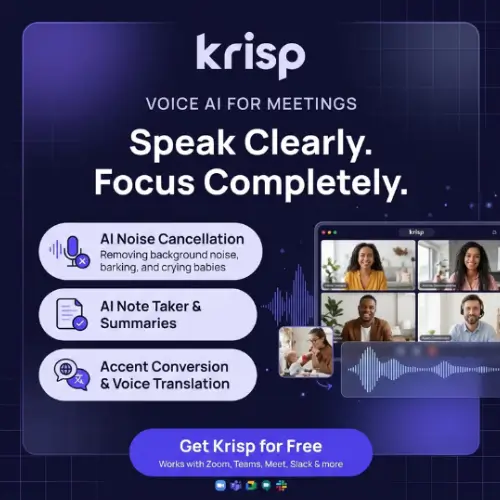
Have you ever been on a video call where the other person sounds like they are calling from inside a wind tunnel? Or maybe you are the one with the barking dog in the background. That is exactly the problem Krisp was built to solve. Krisp is a voice AI application that sits on your computer and cleans up the audio on your calls. It started as a simple noise cancellation tool, but today it does much more. It can transcribe your meetings, record them, write AI notes, and even change your accent in real time. Whether you are a remote worker, a salesperson, or someone who just wants cleaner calls, Krisp tries to be the one tool that handles it all.
What Exactly Does Krisp Do?
The simplest way to understand Krisp is to think of it as a filter between your microphone and your calling app. When you speak, Krisp removes the background noise before the sound reaches Zoom, Google Meet, Microsoft Teams, or Slack Huddles.

This means the people on the other side hear your voice clearly, without the keyboard clicks, traffic sounds, or echo from your room. What makes Krisp different from many other tools is that it works at the audio level on your device.
It does not need to send a bot into your meeting to take notes. You just install it, set it as your microphone and speaker in your calling app, and it runs quietly in the background .
The Meeting Assistant: Notes Without the Awkward Bot
One of the biggest annoyances with AI meeting assistants is the bot problem. You know the one: a strange name joins the call, everyone gets a notification, and the host has to explain what it is. Krisp avoids this by capturing audio directly from your computer. Because it works on your device, it can take notes on any calling app without sending a bot into the meeting. That said, if you actually prefer having a bot join—maybe for a team meeting where everyone expects it—you can turn that feature on too. There is also a Chrome extension for meetings that happen inside your browser .
After each meeting, Krisp gives you a transcript, a recording, a summary, and a list of action items. You can also chat with an AI about what was said. For example, if you forgot what was decided about the project deadline, you can ask the AI and it will search through the meeting and tell you. The mobile app is useful for in-person conversations and outbound phone calls, which means you are not limited to video meetings .
How Krisp Connects to Your Other Tools
Taking notes is helpful, but notes that sit in one app are not very useful. Krisp understands this, so it lets your meeting notes flow into other tools through integrations and webhooks. More interestingly, Krisp connects to AI assistants like Claude and ChatGPT through something called MCP, which stands for Model Context Protocol. This is a technical way of saying that your AI assistant can look up what was decided in a past meeting. If you are using Claude Code or Cursor for work, you can connect it to your Krisp workspace and ask questions like “What did we agree on in last week’s client call?” The AI will search your Krisp meeting data and give you an answer . For people who rely on AI tools daily, this is a genuinely useful bridge between meeting history and daily work.
Noise Cancellation and Accent Conversion
The noise cancellation feature is what made Krisp famous, and it is still one of its strongest selling points. It removes background noise and echo from both sides of the call. This means if the person you are talking to is in a noisy café, you will hear them more clearly too. It handles sounds like barking dogs, keyboard clicks, construction noise, and even the dreaded echo that happens when someone forgets to use headphones .
Accent conversion is a more unusual feature. It changes the speaker’s accent in real time to make the conversation clearer. According to Krisp’s official documentation, it converts accented English to North American English while keeping the speaker’s voice intact. The supported accents include Indian, Filipino, South African, and Latin American English . This feature was designed mainly for call centers, where clear communication is critical. For individuals, it might feel a bit strange at first, but for teams working across different regions, it can make a real difference in how easily people understand each other.
For Call Centers and Developers
Krisp is not just for individual workers. It has a separate product line for call centers, called Call Center AI. This version adds real-time voice translation, an agent assist panel, speech analytics with call scoring, compliance monitoring, and even voice fraud detection. For BPO teams that handle customer calls all day, these features can help agents work faster and more accurately .
Developers also have a place in the Krisp ecosystem. If you are building your own voice AI agents, you can use Krisp’s voice isolation and turn-taking models in your own products. There is a self-serve voice translation API as well. This means the same technology that cleans up Zoom calls can be built into other applications, from customer support bots to voice-enabled apps .
Krisp Pricing: What You Need to Know
Krisp’s meeting assistant is a paid product, but there is a 7-day free trial that unlocks the premium features without requiring a credit card. The pricing below is based on the official Krisp pricing page. Annual billing costs less than monthly billing, and the prices shown reflect the per-user monthly cost when billed annually .
| Plan | Price (per user/month, billed annually) | Key Features |
|---|---|---|
| Free Trial | $0 for 7 days | Unlimited transcription, noise cancellation, recording, AI notes, limited accent conversion |
| Pro | $8 (monthly: $16) | Transcripts and summaries in 16+ languages, in-person meeting support, 60 min/day accent conversion, 5 GB storage, HIPAA and GDPR compliance |
| Business | $15 (monthly: $30) | Everything in Pro, plus SSO/SCIM, 4 hr/day accent conversion, 30 GB storage, note-taking mode enforcement |
| Enterprise | Custom pricing | Advanced security and reports, SOC2 report access, BAA signing, data center location choice, private on-device transcription and recordings |
| CC Core (Call Center) | Starts at $10 per agent/month, billed annually | Core agent productivity, real-time bidirectional voice translation across 80+ languages, aggregated reporting |
| CC Advanced (Call Center) | Custom pricing | Everything in CC Core, plus real-time agent accent conversion to customer’s native accent, call-aware AI chat |
It is worth noting that noise cancellation is built into every Krisp plan. There is no separate “noise cancellation only” plan because it is included with all of them. If you only want Krisp for clean audio and do not care about meeting notes, you can simply disable the Meeting Assistant . The Call Center plans typically require a minimum commitment of around 40 seats, so they are designed for larger teams rather than individuals .
Does Krisp Need a Bot to Join My Meetings?
No. This is one of the most common questions people ask, and the answer is straightforward. Krisp captures audio on your device, so it takes notes on any calling app without a bot. You can turn on a bot for meetings where you prefer one, but it is never required. For many people, this is the main reason they choose Krisp over other meeting assistants. No awkward bot introductions, no host permissions to worry about, and no extra participants in the call .
Final Thoughts
Krisp has come a long way from being just a noise cancellation tool. It now sits at the intersection of audio quality and meeting productivity. The fact that it works without a bot is a real advantage for people who do not want to change how their meetings run. The accent conversion feature is unique and useful for international teams, even if it might feel unusual at first. The MCP integration with AI assistants is a smart move that makes meeting data more useful in daily work. The main downside is that Krisp is not free. The removal of a free tier has disappointed some casual users, and the pricing is on the higher side for individuals in some markets . But for remote workers and sales teams who spend hours on calls every day, the combination of clean audio and automatic notes can easily justify the cost.
Alternatives to Krisp
If Krisp does not feel like the right fit, here are some alternatives worth considering.
IRIS Clarity
A specialized noise cancellation tool that removes background noise from both sides of the call. It does not offer meeting notes or transcription, so it is best for teams that only care about voice isolation and audio clarity .
Fireflies.ai
A meeting assistant that focuses on searchable meeting intelligence. It joins your calls as a bot, transcribes them, and lets you search across all your past conversations. It supports over 100 languages .
MeetGeek
An AI meeting assistant that automates meeting management, analytics, and workflows. It is a good choice if you want meeting summaries and action items without worrying about noise cancellation .
Supernormal
A bot-free AI meeting notetaker that turns calls into client-ready deliverables. It is built specifically for agencies and teams that need polished meeting outputs rather than just raw notes .
HyNote
A tool that turns meetings, audio files, PDFs, and YouTube videos into summaries and action items. It supports transcription in more than 50 languages, making it a flexible option for mixed media .



