
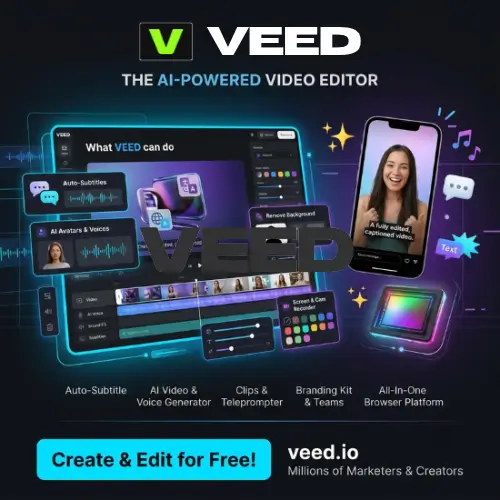
Creating professional-looking videos is no longer limited to people who have expensive computers or years of video editing experience. Today, several online tools make video creation much easier with the help of artificial intelligence. One such platform is VEED.
VEED is an online video editing and AI video creation platform that helps users create, edit, improve, and share videos without installing complicated software. Whether you want to make YouTube videos, Instagram Reels, TikTok videos, business presentations, advertisements, or educational content, VEED provides several tools in one place.
The platform is especially useful for content creators, marketers, teachers, business owners, and people who regularly work with videos. You can upload your own footage, edit it using a simple editor, generate subtitles automatically, remove background noise, translate videos, and even create AI-generated videos.
Another interesting thing about VEED is that it is not just a traditional video editor anymore. It has expanded into AI-powered video creation, offering AI avatars, text-to-video generation, voice tools, image generation, and other creative features.
In this article, we will explore VEED’s features, pricing, advantages, disadvantages, and some of the best alternatives you can try.
What is VEED?
VEED is an online video editing and AI content creation platform that allows users to create professional videos directly from their web browsers. It offers traditional editing tools as well as AI-powered features that help users save time and reduce manual work.
You don’t need to download heavy editing software or have advanced technical knowledge to get started. Simply visit the VEED website, create an account, and start working on your video projects.
With VEED, you can trim videos, add text, insert images, include background music, generate subtitles, record your screen, and improve audio quality. It also offers AI tools that can generate videos from text prompts, create talking avatars, clone voices, and translate video content into different languages.
One of its biggest advantages is that most of the important video creation tools are available in one workspace. This means you don’t have to switch between different applications for basic editing, subtitles, audio improvements, and video creation.
VEED was founded in 2018 by Sabba Keynejad and Tim Mamedov. The company originally focused on making video editing easier for everyone. Today, it has grown into an AI-powered video creation platform used by creators and businesses worldwide. AI Video Creation for Everyone+1
Key Features of VEED
VEED offers a wide range of features for different video creation needs. Let’s look at some of its most useful tools.
1. Online Video Editor
The online video editor is one of the main features of VEED. It allows you to edit videos directly from your browser without installing additional software.
You can upload videos, images, and audio files and arrange them on the editing timeline. The editor provides tools for trimming clips, splitting videos, adding transitions, inserting text, and adjusting different elements.

You can also add background music, sound effects, logos, stickers, and other visual elements to make your videos more interesting.
The editor is useful for both beginners and experienced creators who want to make quick changes without opening complicated editing applications.
2. AI Video Generator
VEED includes an AI Video Generator that helps users create video clips from simple text prompts. Instead of recording everything yourself, you can describe the scene you want to create, and the AI tool will generate a video based on your instructions.
For example, you could enter a prompt asking for a beautiful sunset over a mountain range, a futuristic city, or a product advertisement.
This feature is helpful for people who need original visual content but don’t have cameras, actors, or recording equipment.
AI video generation uses credits, and the number of credits required depends on the selected model and generation settings.
3. AI Avatars
Creating videos with human presenters can take time and effort. You need to prepare a script, record yourself, and edit the footage.
VEED’s AI Avatar feature offers another option. It allows you to create videos featuring AI-generated presenters who speak your written script. This can be useful for:
- Educational and training videos.
- Product demonstrations.
- Business presentations.
- Social media content.
- Marketing and promotional videos.
- Explainer videos.
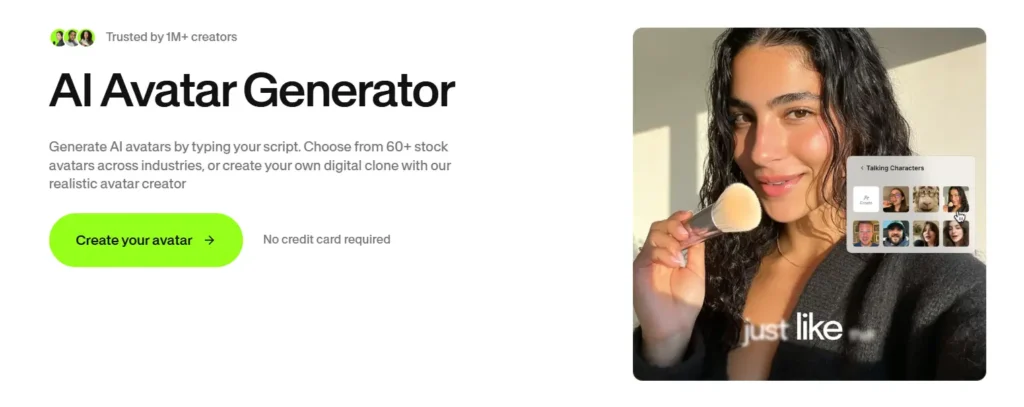
You can use AI presenters to communicate information without recording yourself in front of a camera.
VEED also offers options for creating custom characters using your own face and voice, depending on the available plan and feature access.
4. Automatic Subtitle Generator
Adding subtitles manually can be a time-consuming task, especially when working with long videos.
VEED’s Automatic Subtitle Generator makes this process easier. It uses AI to understand the spoken words in your video and convert them into text.
After generating subtitles, you can review and correct the text, change the font, adjust the size, select colours, and customize the subtitle style. This feature is particularly useful for YouTube creators, Instagram influencers, online educators, and businesses.
Subtitles also help viewers understand your content when they watch videos without sound.
5. AI Video Translation and Dubbing
If you create content for an international audience, language can sometimes become a problem. VEED provides AI-powered video translation and dubbing tools that help you make your videos available in different languages.
You can translate spoken content and create dubbed versions of your videos. This makes it easier to reach viewers who speak different languages.
For example, if you have an English video, you can create translated versions for audiences who speak Spanish, French, German, or other supported languages.
This feature is useful for international businesses, educational platforms, YouTube channels, and content creators who want to reach a wider audience.
6. AI Voice Generator and Text-to-Speech
VEED also provides AI voice tools that can convert written text into spoken audio. Simply enter your script, choose an available AI voice, and generate audio for your video.
This is helpful for creators who make faceless YouTube videos, tutorials, advertisements, and educational content. You can use AI-generated voiceovers instead of recording your own voice every time.
The platform also provides voice-related tools such as voice cloning, subject to feature availability and applicable permissions.
7. AI Background Remover
Removing the background from a video can make it look more professional. Traditionally, this process required a green screen or advanced editing software.
VEED provides an AI Background Remover that can help separate the main subject from the background. You can use this feature to remove unwanted backgrounds and create a cleaner video appearance.
It is useful for product videos, presentations, promotional content, and social media videos.
8. AI Eye Contact Correction
Sometimes, people look at their scripts instead of looking directly at the camera while recording videos.
This can make a video feel less natural. VEED’s AI Eye Contact Correction tool helps adjust the appearance of eye contact so that the speaker looks more directly at the camera.
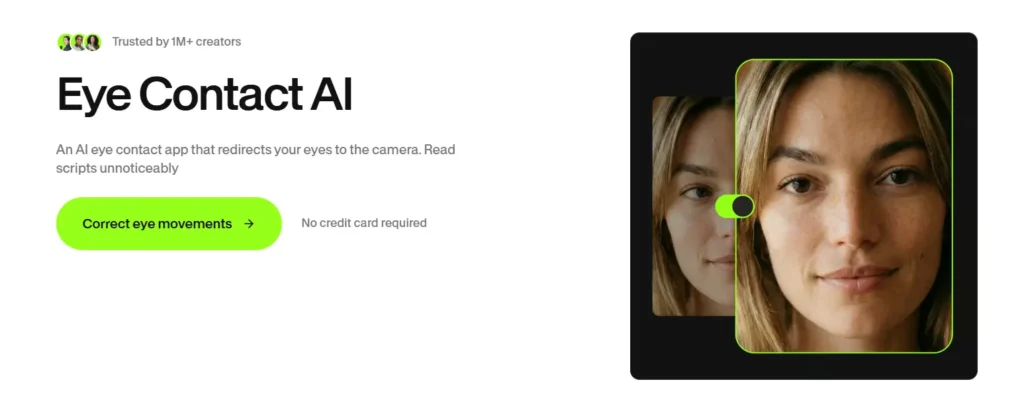
It can be useful for online meetings, recorded presentations, tutorials, and talking-head videos.
This feature is especially helpful when you record videos using a teleprompter or read from written notes.
9. AI Clips Generator
If you regularly create long videos, you probably know how much time it takes to turn them into short clips.
VEED’s AI Clips feature helps automate this process. It can identify interesting moments from longer videos and turn them into shorter clips suitable for platforms like YouTube Shorts, Instagram Reels, and TikTok.
The tool can also add subtitles, automatically frame the speaker, and remove filler words.
This is particularly useful for podcasters, interview channels, educators, and creators who want to reuse their existing video content. VEED Help Center
10. Screen and Webcam Recorder
VEED includes screen and webcam recording tools. You can record your computer screen, webcam, or both together, depending on your recording requirements.
This is useful for creating software tutorials, product demonstrations, online lessons, presentations, and step-by-step guides.
You can record your content and edit it in the same workspace without moving between different applications.
11. AI Audio Cleaner
Poor audio quality can make even a good video difficult to watch. VEED offers audio improvement tools that help reduce unwanted background noise and make voices clearer.
For example, if you record a video in a room with fans, traffic, or other background sounds, the audio cleaning feature can help improve the final result.
It is useful for vloggers, podcasters, online teachers, and people who record videos at home.
12. Video Templates
Not everyone wants to create a video from scratch. VEED provides ready-made video templates that help users get started quickly.
You can choose templates for social media posts, advertisements, promotional videos, presentations, and other content formats.

After selecting a template, you can customize the text, colours, images, videos, and other elements.
This feature is useful for beginners and small businesses that want attractive videos without spending too much time on design.
13. AI Image Generator
VEED also offers AI image generation tools that allow users to create images using written prompts. You can describe the image you want and use the generated visuals in your video projects.
This is helpful when you need custom images for presentations, advertisements, thumbnails, or social media content.
Instead of searching through stock image websites, you can generate visuals based on your requirements.
14. Brand Kit and Team Collaboration
For businesses and marketing teams, maintaining a consistent visual style is important. VEED offers Brand Kit features that allow users to manage brand-related elements such as logos, colours, and fonts.
This makes it easier to create videos that follow the same branding guidelines.
Team collaboration features also help multiple people work within a shared workspace. This can be useful for agencies, marketing departments, and businesses that regularly produce video content.
How to Use VEED?
Getting started with VEED is quite simple. You don’t need advanced video editing knowledge to use the platform. Follow these basic steps:
- Visit the official website: Open VEED Official Website in your browser.
- Create an account: Sign up using your Google, Apple, Microsoft, or work email account.
- Choose a project: Start with an AI-generated video, upload your existing footage, or open a blank editing project.
- Edit your video: Add text, subtitles, images, music, transitions, and other elements.
- Use AI tools: Try automatic subtitles, AI voice generation, background removal, video translation, or other available features.
- Preview your work: Watch the complete video and make any changes if needed.
- Export your video: Once everything looks good, export your finished video and share it on your preferred platform.
The platform works through a web browser, so you can start creating videos without downloading traditional desktop editing software.
VEED Pricing and Plans
VEED offers different subscription options depending on how frequently you create videos and which features you need. There is a free plan for beginners, while paid plans provide additional editing options, AI features, and higher usage limits.
Here is an overview of its available plans:
| Plan | Price | Best For |
|---|---|---|
| Free | $0 | Beginners who want to try VEED |
| Creator | Starts at $20/month | Individual creators and regular video production |
| Pro | Check official pricing | Professional creators and advanced editing |
| Studio | Check official pricing | Small teams and collaborative work |
| Enterprise | Custom pricing | Large businesses and organizations |
Important pricing information:
- Creator pricing starts at $20 per month according to VEED’s 2026 product information.
- Paid plans include different monthly AI credit allowances.
- AI credits are used for video and other AI generations.
- Credit requirements depend on the selected AI model and generation settings.
- Paid plans include unlimited subtitle generation subject to a fair-use limit of 50 hours per month.
- Translation usage has separate minute-based limits.
- Team subscriptions are charged per user seat.
Prices and available features can change depending on the billing period, region, and subscription configuration. Check the official pricing page before purchasing to see the exact current amount and included features. VEED+1
Who Should Use VEED?
VEED is designed for people who want to create videos without spending too much time learning complicated editing software. Here are some types of users who may find it useful.
1. YouTube Creators
YouTube creators can use VEED to edit videos, generate subtitles, create short clips, record tutorials, and improve audio quality. It can also help creators who run faceless channels using AI-generated voiceovers and visuals.
2. Social Media Influencers
Instagram, TikTok, and YouTube Shorts creators can use its templates, automatic captions, and AI Clips feature to produce content more quickly.
3. Digital Marketers
Marketing professionals can create promotional videos, product advertisements, social media campaigns, and branded content using VEED’s editing and AI tools.
4. Small Business Owners
Small businesses can create product demonstrations, promotional videos, presentations, and customer information videos without hiring a professional video editor for every project.
5. Teachers and Online Educators
Teachers can record lessons, create educational videos, add subtitles, and translate content for students who speak different languages.
6. Agencies and Marketing Teams
Agencies can use shared workspaces, Brand Kits, and collaboration features to manage video production for different clients.
Pros and Cons of VEED
Before choosing any video editing platform, it is important to understand both its advantages and limitations.
Pros
- Easy to use: The interface is beginner-friendly and does not require advanced editing skills.
- Browser-based editing: You can edit videos without installing heavy desktop software.
- Multiple AI tools: Video generation, avatars, voice tools, and automatic subtitles are available in one platform.
- Automatic subtitles: Saves time by converting spoken words into captions.
- Video translation: Helps creators reach audiences in different languages.
- Social media support: Useful for creating videos for YouTube, Instagram, TikTok, and other platforms.
- Screen recording: Allows you to record tutorials and presentations.
- Team collaboration: Helpful for businesses and marketing teams.
- Ready-made templates: Makes video creation easier for beginners.
Cons
- Internet connection required: Since VEED is primarily an online platform, a stable internet connection is important.
- Free plan limitations: The free version has restrictions, so it may not be suitable for regular professional work.
- AI credit limits: AI video and image generation consume credits, and some generations can require more credits than others.
- Subscription costs: Regular users may need a paid subscription to access advanced features.
- Browser performance: Editing large projects may require a reasonably powerful computer and sufficient internet speed.
- AI results need checking: Generated videos, subtitles, and voiceovers may sometimes contain mistakes that require manual correction.
Is VEED Worth It?
VEED is worth considering if you regularly create videos and want multiple editing and AI tools in one place. Its biggest advantage is convenience. You can edit existing videos, create AI-generated content, add subtitles, improve audio, and translate videos without switching between several applications.
For beginners, the simple interface makes it easier to understand the basic editing process. Experienced creators can also benefit from its AI tools, especially when producing short-form videos or handling repetitive editing tasks.
However, VEED may not be the best choice for everyone. If you need advanced colour grading, professional visual effects, or complete control over complex editing timelines, desktop applications may offer more flexibility.
You should also consider the AI credit system before purchasing a subscription. If you plan to generate many AI videos, check how many credits your selected plan provides and how much each generation costs.
Overall, VEED is a useful option for creators, marketers, businesses, and educators who want a convenient online video creation platform.
Final Thoughts
VEED has developed into much more than a basic online video editor. It combines traditional editing tools with AI-powered features that make video creation easier for different types of users.
Whether you want to create YouTube videos, add subtitles to existing footage, generate AI videos, create talking avatars, or translate content into other languages, VEED offers several tools to help you complete these tasks.
Its beginner-friendly interface is one of its strongest points. You don’t need to be a professional editor to start creating videos.
The main things to consider are subscription costs, AI credit limits, and the features available in each plan.
If you are looking for an all-in-one online video editing and AI creation platform, VEED is definitely worth trying.
Alternatives to VEED
If VEED doesn’t meet your requirements or you want to explore other video editing platforms, here are some good alternatives with similar features.
1. InVideo AI
InVideo AI allows users to create videos from text prompts using AI-generated scripts, visuals, voiceovers, and subtitles. It is particularly useful for creating YouTube videos, advertisements, and social media content.
2. Descript
Descript makes video and audio editing easier by allowing users to edit recordings through text transcripts. It also offers AI voice tools, automatic transcription, and tools for removing unwanted words and improving recordings.
3. Canva
Canva offers an easy-to-use video editor with ready-made templates, animations, stock media, and AI-powered design tools. It is useful for creating social media videos, presentations, promotional content, and advertisements.
4. Kapwing
Kapwing is an online video editor that offers subtitles, AI-powered editing, video resizing, and collaboration tools. It is a good choice for creators and teams who want to edit videos directly in their browsers.
5. CapCut
CapCut is a popular video editing application for creating short-form and long-form videos. It provides automatic captions, effects, transitions, templates, background removal, and several AI-powered editing features.
6. DaVinci Resolve
DaVinci Resolve is a powerful video editing application with professional editing, colour correction, visual effects, and audio production tools. It is a good alternative for users who need more control over advanced video editing.



