If you want to grow on social media today, you need to post a lot of videos. But let’s be honest, making good quality videos for platforms like TikTok, Instagram Reels, and YouTube Shorts takes a lot of time and money. You usually need a camera, good lighting, and maybe even a video editor.
This is where Topview AI comes in to save the day. It is a smart platform built to create marketing videos using powerful AI tools. If you sell products on Shopify, Amazon, or an app store, this tool is designed exactly for you. It helps you make a steady stream of video ads without the huge cost of hiring a film crew or a professional editor.
Here is a simple, easy-to-understand review of Topview AI, how it works, its features, and if it is worth your money.
What Exactly is Topview AI?
Topview AI is an all-in-one video creation platform. Its main goal is to help entrepreneurs and small marketing teams produce content at a rapid pace. Instead of spending days shooting and editing a single ad, you can generate multiple video clips in just a few minutes.
The platform focuses heavily on “UGC” (User Generated Content) style videos. These are the types of videos that look natural, like a real person is reviewing or showing off a product. This style performs the best on social media because it doesn’t look like a boring, traditional TV commercial.
How Does the Process Work?
The process is very straightforward and beginner-friendly. You do not need any technical video editing skills. Here is how you do it:
- Give it your inputs: You can simply paste a product URL, upload some images of your product, or provide a “reference video” (like a viral ad you saw and want to copy).
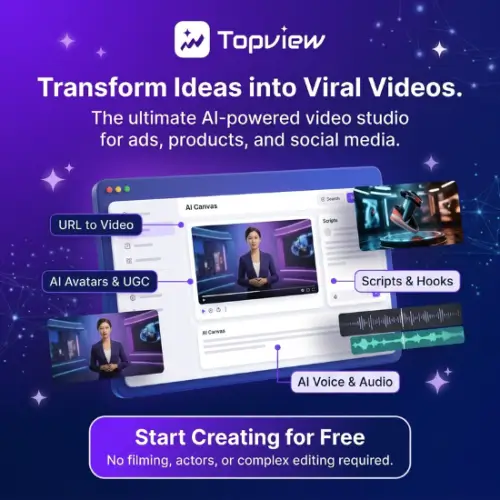
- Let the AI work: Topview AI takes your inputs and generates a complete video. It writes the script, adds a synthetic voiceover, and even creates an AI avatar to act as the presenter.
- Edit and Export: Once the AI makes the first draft, you can watch it. If you want to change anything, you can make manual adjustments. When you are happy with it, you just download the video and post it.
Key AI Features That Make It Stand Out
Topview AI is packed with smart features. Here is a breakdown of the main AI tools it offers:
Viral Video Agent
This is the main hook of the platform. You upload an image of your product and a reference video. The AI analyzes the style, pacing, and hooks of the viral reference video. Then, it creates a brand new video for your product that mimics that winning style.
AI Avatars and Product Avatars
You can create digital presenters from just a single photo. A really cool feature here is the “Product Avatar.” It generates a video of an AI avatar actually “holding” or showcasing your specific product. This is perfect for e-commerce listings where you need a human touch but don’t want to hire actors.
Product Anyshoot
This feature takes your static, plain product photo and inserts it into various AI-generated scenes. It can also place your product on a virtual model. It is a very fast way to create “try-on” videos for clothing or lifestyle shots for gadgets.
AI Scripting
Writing scripts is hard, but Topview uses GPT-4o to write them for you. The AI has been trained on over 5 million videos. This means it actually understands what makes a marketing script catchy and what makes people stop scrolling.
Voice and Captions
For the voiceovers, the tool uses top-tier AI voices from OpenAI and ElevenLabs. The voices sound very natural and human-like. It also auto-generates captions in various trendy styles, which is a must-have for social media videos since many people watch without sound.
Character Swap
If you have an existing photo or video of a person, you can use this tool to replace their face and body with one of your custom AI avatars. It is a fun and easy way to reuse old content.
Multi-Language Support
If you sell products in multiple countries, this is a lifesaver. The tool supports over 20 languages for both the scripts and the voiceovers. You can easily translate your video ads to reach a global audience.
Extra Features That Make Life Easier
Aside from the heavy AI lifting, Topview AI has some quality-of-life features:
- Direct URL Import: You do not need to manually type in product details. The tool can pull images, descriptions, and prices directly from Amazon, eBay, Shopify, Etsy, and app store links.
- Manual Editing: You are not totally locked into the AI’s first draft. After the video is generated, you can go in, change the text, swap the voice, or adjust the clips. You still have full control.
Pros and Cons of Topview AI
Pros:
- Saves a massive amount of time and money on video production.
- Very easy to use, even if you have zero editing experience.
- Great for making UGC-style ads that actually convert on TikTok and Reels.
- Direct store integration makes importing products a breeze.
Cons:
- AI voices and avatars can sometimes look a little robotic if you look very closely.
- The free plan has strict limits, so you need to pay to use it for real business.
- It is highly focused on e-commerce, so it might not be the best for general vlog-style content.
Topview AI Pricing Plans
Topview AI uses a credit‑based system. Each plan gives you a set number of credits every month, and you can also buy extra credits or multiply them (1x to 5x) if you need more. There is a Monthly / Annually toggle (annual saves up to 73% off) and separate Individual and Team plans. The prices below show the current Black Friday deal (regular price is struck through).
| Plan | Deal Price | Regular Price | Credits / Month | What You Get | Best For |
|---|---|---|---|---|---|
| Basic | $8/mo (56% off) | $18 | 50 credits (~250 GPT Image 2 images, ~33s Seedance 2.5 720P video) | Access to all models, all in‑platform features, 4 concurrent tasks, MCP for AI tools, API access | An affordable way to get started |
| Plus | $24/mo (33% off) | $36 | 100 credits (~500 images, ~66s video) | Same features as Basic + credit multiplier option | Quick start for AI creators |
| Business | $58/mo (23% off) | $75 | 250 credits (~1,250 images, ~166s video) + Unlimited & free gens (Nano Banana 2 & Pro, Seedream 5.5 & 5.0, Seedance 1.0 Pro Fast) | 8 concurrent tasks, 59% off extra credit packs, MCP, API | Films, short series, and bulk creation |
| Ultra | $112/mo (25% off) | $450 | 500 credits (~2,500 images, ~333s video) + Unlimited & free gens | 12 concurrent tasks, 59% off extra credit packs, Black Friday 2‑year deal (6 months free at $40/mo) | Cheapest credits per video for heavy creators |
A Few Quick Notes on Pricing
- Credits are the currency. One credit roughly equals one image or a few seconds of video. Bigger plans give you far more video seconds per credit.
- Business and Ultra unlock “Unlimited & Free Gens” on selected models like Seedream and Seedance, which is a huge deal if you generate a lot of content.
- Buy Credits / Multiply Credits lets you top up any plan (1x–5x) without upgrading, so you never run out mid‑campaign.
- Annual billing and the Black Friday 2‑year Ultra deal offer the deepest discounts if you plan to use Topview long term.
Final Thoughts
If you are looking for efficiency in your marketing campaigns, Topview AI is exactly what you need. Creating clips and videos with this tool is much faster and cheaper than traditional video production.
For social media creators and e-commerce sellers, the ability to pump out high-quality, UGC-style videos daily is a massive advantage. While it might not replace a high-end professional film crew for a TV commercial, it is absolutely perfect for TikTok, Instagram Reels, and YouTube Shorts. If you want to scale your video ads without scaling your budget, Topview AI is definitely worth a try.
Alternatives to Topview AI
Here is a quick look at some of the best alternative tools that offer similar features for creating AI videos and marketing content.
| Alternative Name | Description |
|---|---|
| Nexscope | Combines ecommerce data, competitor ad analysis, and keyword research in one workflow. It also creates AI-generated UGC videos for your products. |
| HeyGen | Focuses heavily on creating ultra-realistic AI avatars and translating videos into multiple languages. It is excellent for professional talking-head style marketing videos. |
| InVideo AI | A great all-in-one tool for generating social media videos from simple text prompts. It has a massive template library and is very easy to use for beginners. |
| CapCut | While known as a manual editor, it now has powerful built-in AI features like auto-captions, AI characters, and script generation, making it a great free/cheap alternative. |