Artificial intelligence has changed the way people create digital content. Today, you do not need an expensive camera, professional editing software, or a complete design team to create attractive images and videos. AI tools can help you turn simple ideas into creative content within minutes.
One platform that brings many of these creative features together is OpenArt.
OpenArt is an all-in-one AI creative platform that allows users to generate images, create videos, build consistent characters, edit visual content, generate audio, and work on 3D scenes. Instead of switching between different AI websites for every task, you can use multiple creative tools from one workspace.
What makes OpenArt interesting is that it is not limited to basic text-to-image generation. It also includes advanced video creation features, AI characters, multi-scene video production, and an AI Podcast Video Generator.
Whether you are a content creator, designer, marketer, YouTuber, or business owner, OpenArt offers several tools that can make your creative work easier.
In this OpenArt review, we will explore its features, how it works, pricing, advantages, disadvantages, and some of the best alternatives available.
What Is OpenArt?
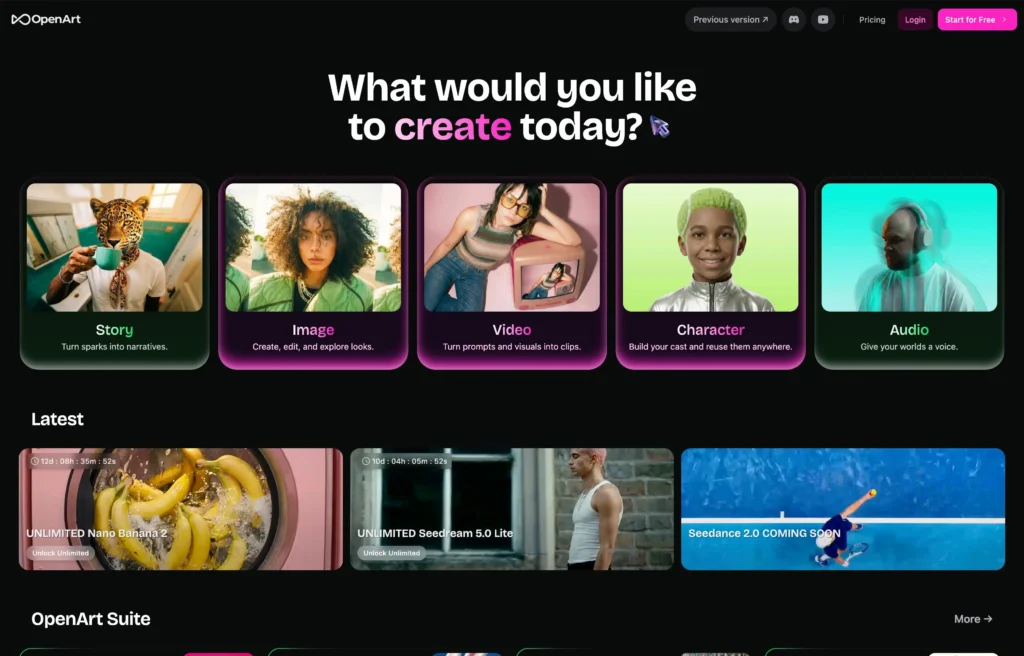
OpenArt is an AI-powered creative platform designed to help people create images, videos, characters, audio, and other digital content. It brings different AI models and creative tools together in one place.
You can describe an image using a text prompt, upload a reference picture, or use editing tools to change an existing image. You can also turn images into videos and create longer multi-scene projects with OpenArt Director.
One of its useful features is character consistency. You can create a character once and reuse the same character in different images, videos, and stories. This is helpful for creators who want to build a recognizable AI personality or use the same character across multiple projects.
OpenArt also provides a shared asset library where you can save characters, reference images, brand materials, and other creative assets.
The platform is useful for:
- YouTubers and social media creators.
- Graphic designers and digital artists.
- Marketing agencies and business owners.
- People creating AI-generated advertisements.
- Storytellers and filmmakers.
- Brands that need regular visual content.
- Creators interested in AI-generated podcasts.
In simple words, OpenArt helps you turn creative ideas into visual and audio content without needing advanced technical skills.
Key Features of OpenArt
OpenArt offers several AI-powered features. Let’s look at some of its most useful tools.
1. AI Image Generation
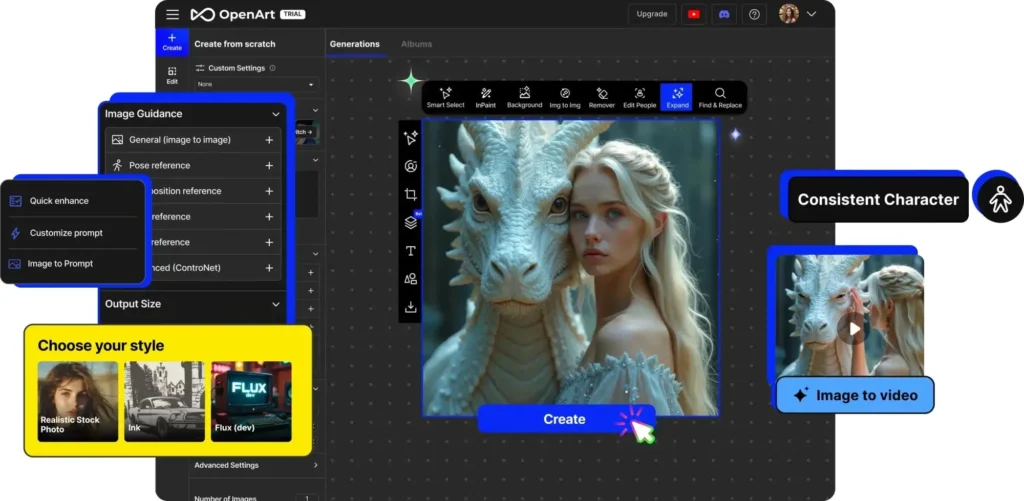
AI image generation is one of the main features of OpenArt.
You can create images simply by describing what you want. For example, you can enter a prompt such as:
“A professional young businessman standing in a modern office, natural lighting, realistic photography, high detail.”
OpenArt processes your prompt and generates an image based on your description.
You can use image generation for:
- Social media posts.
- Website banners.
- Blog featured images.
- Product advertisements.
- Digital artwork.
- Marketing materials.
- YouTube thumbnails.
- Character illustrations.
Another advantage is that OpenArt provides access to multiple AI image models. This gives you more flexibility when choosing a particular visual style or image quality.
2. Advanced AI Image Editing
Generating an image is only one part of the creative process. Sometimes, you already have an image but want to make a few changes.
OpenArt includes several image editing tools that can help.
Some of its editing capabilities include:
- Inpainting: Change or replace a selected part of an image.
- Outpainting: Extend an image beyond its original borders.
- Background replacement: Remove or change the background.
- Upscaling: Improve image resolution and details.
- Relighting: Adjust the lighting of an image.
- Camera angle changes: Create different viewpoints of a scene.
- Object replacement: Replace unwanted objects with something else.
For example, imagine you have a product image with a simple white background. You can use AI editing to place the product in a modern office, luxury room, or outdoor setting.
This can save time and reduce the need for traditional photo editing software.
3. Consistent AI Character Creation
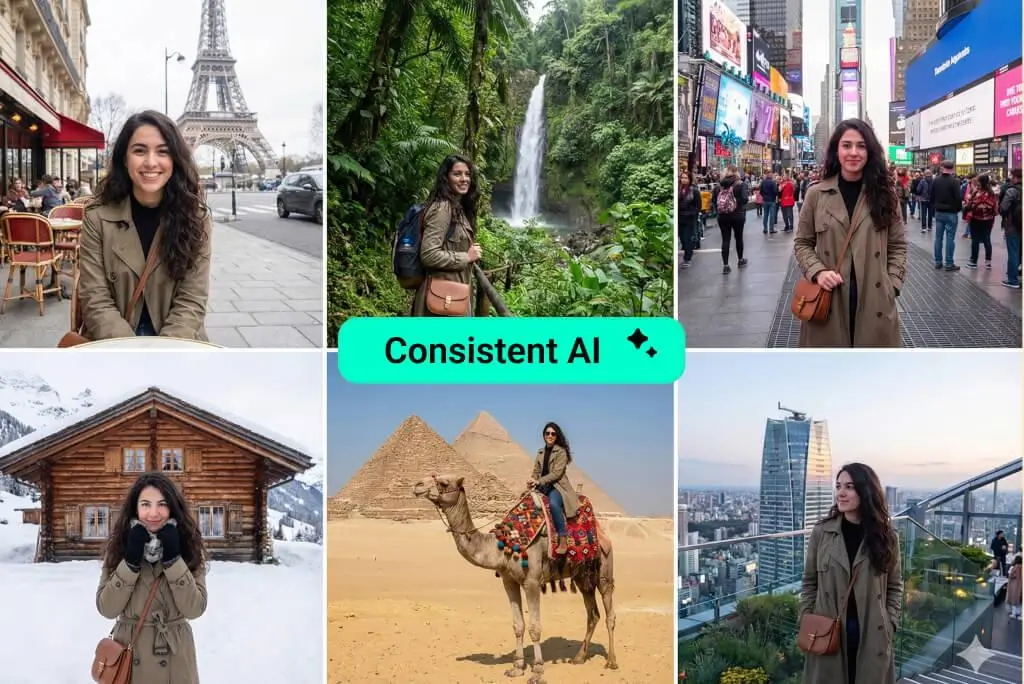
Character consistency is one of the most interesting features of OpenArt.
Many AI image generators struggle to create the same person repeatedly. Even when you use the same prompt, the face, hairstyle, or appearance may change.
OpenArt allows you to build reusable characters using an image or description.
Once you have created a character, you can use that character in different scenes and creative projects.
For example, you can create an AI influencer and generate images of that person:
- Sitting in a coffee shop.
- Walking through a city.
- Wearing different outfits.
- Working in an office.
- Promoting a product.
- Appearing in different video scenes.
This feature can be useful for social media influencers, YouTube channels, digital storytelling, and brand mascots.
You do not have to recreate the character from the beginning every time.
4. AI Video Generation
OpenArt is not just an image generator. It also provides AI video generation tools.
You can create videos using text prompts or reference images. Depending on the selected model, you can generate different types of motion, visual styles, and video scenes.
For example, you can upload a picture of a person standing on a beach and ask AI to turn it into a short video with moving waves, wind, and camera movement.
Video generation can be useful for:
- YouTube Shorts and Instagram Reels.
- Product advertisements.
- Promotional videos.
- Cinematic scenes.
- Music videos.
- Short films.
- Social media campaigns.
OpenArt supports different video models, so you can choose according to your requirements.
Keep in mind that video generation usually consumes more credits than image generation. The actual cost depends on the model, duration, resolution, and settings you select.
5. OpenArt Director
OpenArt Director is one of the platform’s major features.
Traditional AI video generators usually focus on creating short clips. If you want to make a longer video, you may need to generate multiple clips and edit them together manually.
Director takes a different approach.
You can describe your video idea in simple language, provide reference images or characters, and let the AI help plan and generate individual scenes.
You can then review the scenes and request changes using natural language.
For example, you could write:
“Create a short promotional video for a luxury perfume brand. Show the product in a premium environment with cinematic lighting and smooth camera movements.”
Director can help develop the scenes and build the video around your instructions.
Some of the video formats supported include:
- Short films.
- Product advertisements.
- Music videos.
- Film trailers.
- UGC advertisements.
- Explainer videos.
- Social media content.
- Micro-dramas.
- Podcast videos.
According to OpenArt’s official feature page, Director supports videos up to five minutes long. Actual generation requirements and credit costs depend on the project and settings.
This feature can be especially useful for creators who want to produce more complete video projects without managing every technical editing step themselves.
6. AI Podcast Video Generator
The AI Podcast Video Generator is another interesting feature available through OpenArt Director.
It helps you create video podcast episodes using AI-generated hosts, backgrounds, and scenes.
You can describe the podcast topic, hosts, studio environment, and overall style. You can also provide reference images to guide the appearance of the hosts.
OpenArt then helps create a podcast-style video that you can review and improve.
For example, you could create:
- A two-person technology podcast.
- An AI news discussion.
- A business interview show.
- An educational video podcast.
- A fictional conversation between two characters.
You can also make changes to the episode by giving simple instructions. For example, you can ask the AI to change the scene, adjust the mood, add a guest, or improve the pacing.
Another useful feature is the ability to create shorter clips from podcast-style content for social media.
Important: This tool generates an AI podcast video. It is not a remote recording studio for recording a real conversation with another person.
For YouTubers and social media creators, this can be an interesting way to experiment with podcast-style content without arranging a physical studio.
7. AI Audio and Music Generation
OpenArt also brings audio tools into its creative workspace.
Audio is important when creating videos, advertisements, and other digital content. A good soundtrack or voice can make a video more interesting.
Depending on the available models and tools, you can generate audio, voices, and music to support your creative projects.
Some possible uses include:
- Background music for videos.
- Audio for short films.
- Voice elements for creative projects.
- Music for social media content.
- Sound for advertisements and presentations.
Having image, video, and audio creation tools in one account can make the overall workflow more convenient.
However, the available audio features and generation limits can depend on the selected model and subscription.
8. 3D Scene Creation
OpenArt also offers 3D-related creative capabilities.
3D scenes can be useful when you want to create more detailed environments, visual concepts, and creative backgrounds.
For example, you may want to develop a futuristic room, a fantasy environment, or a product presentation scene.
These types of visuals can be useful for digital artists, designers, storytellers, and people working on creative projects.
The exact capabilities depend on the tools and models available in the workspace.
9. Brand Kit and Shared Asset Library
If you regularly create content for a business or brand, maintaining a consistent visual style is important.
OpenArt provides a Brand Kit feature where you can store brand-related materials such as:
- Logos.
- Brand colors.
- Fonts.
- Brand guidelines.
- Other visual references.
You can also use the shared asset library to keep your previous generations, reference images, characters, and other creative materials together.
This is useful because you do not need to upload the same reference materials every time you start a new project.
For example, an online store can save its product images and brand assets and reuse them while creating different advertisements.
10. OpenArt MCP
OpenArt also supports MCP (Model Context Protocol), which makes the platform more interesting for people working with AI assistants and agents.
MCP is a technology that allows compatible AI applications to connect with external tools and services.
With OpenArt MCP, compatible AI assistants and agents can request image and video generations through OpenArt.
For example, imagine you are using an AI assistant to plan a marketing campaign. Instead of manually opening an image generator for every creative task, an appropriately connected agent can request image or video generation through the available OpenArt tools.
This can be useful for:
- AI automation workflows.
- Content production systems.
- Developers building AI agents.
- Automated image generation.
- AI-powered marketing workflows.
OpenArt lists MCP access among its subscription features. Check the current plan details and documentation for the exact access and usage limits.
How to Use OpenArt
OpenArt is designed to make AI content creation accessible to beginners. You do not need professional graphic design or video editing experience to get started.
Here is a simple guide to using the platform.
Step 1: Visit the Official Website
Open the OpenArt official website and create an account.
You can explore the platform and check the available trial or subscription options.
Step 2: Select Your Creative Tool
Choose what you want to create. You can start with image generation, image editing, character creation, video generation, or another available tool.
Step 3: Enter Your Prompt
Describe your idea in simple language.
For example:
“Create a realistic image of a golden retriever sitting in a beautiful green garden during the morning, natural sunlight, professional photography.”
Try to include details about the subject, background, lighting, camera angle, and visual style.
Step 4: Choose an AI Model
OpenArt provides access to different AI models. Select a suitable model according to your creative requirements.
Some models may be better for realistic images, while others may work better for illustrations, cinematic visuals, or video generation.
Step 5: Generate Your Content
Adjust the available settings, check the estimated credit cost, and start generating.
You may need to try different prompts or settings to get the result you want.
Step 6: Edit and Improve
If you are not happy with the result, use the editing tools to make changes.
You can remove unwanted objects, change backgrounds, improve image quality, or generate another version.
Step 7: Download and Use Your Creation
Once you are satisfied, download your final creation and use it in your personal projects or business, subject to your subscription rights and OpenArt’s terms.
OpenArt Pricing
OpenArt offers different subscription plans depending on how frequently you create AI images, videos, and other content.
The pricing structure is based on monthly credits. Different models and creative tasks consume different amounts of credits.
Here is a summary of the plans displayed on OpenArt’s official pricing page.
Prices below show the advertised discounted monthly equivalents alongside the regular monthly prices. Annual billing discounts and promotions may change.
| Plan | Regular price | Advertised price | Monthly credits |
|---|---|---|---|
| Starter | $14/month | $13/month | 4,000 |
| Plus | $34/month | $27/month | 12,000 |
| Pro | $56/month | $44/month | 24,000 |
| Wonder | $240/month | $175/month | 106,000 |
Source: OpenArt official pricing page, checked November 6, 2026. Prices are in USD per seat per month. Advertised discounts may require annual billing. OpenArt+1
What Do You Get With Each Plan?
1. Starter Plan
The Starter plan is suitable for people who want to explore OpenArt and create content occasionally.
It includes:
- 4,000 monthly credits.
- Access to 100+ premium image, video, and audio models.
- Access to OpenArt Director.
- Access to OpenArt MCP.
- Up to approximately 13 consistent characters.
- Up to 8 parallel generations.
- Watermark-free generations.
2. Plus Plan
The Plus plan is a better option for regular content creators who need more credits and commercial usage rights.
It includes:
- 12,000 monthly credits.
- Up to approximately 40 consistent characters.
- 16 parallel generations.
- Access to Director and MCP.
- Access to premium AI models.
- Commercial usage rights.
- Watermark-free generations.
3. Pro Plan
The Pro plan is designed for people who create images and videos more frequently.
It includes:
- 24,000 monthly credits.
- Up to approximately 80 consistent characters.
- 32 parallel generations.
- Access to premium models.
- Commercial usage rights.
- Director and MCP access.
- Watermark-free generations.
4. Wonder Plan
Wonder is the highest-volume individual plan listed on the pricing page.
It includes:
- 106,000 monthly credits.
- Up to approximately 353 consistent characters.
- 32 parallel generations.
- Access to premium image, video, and audio models.
- Commercial usage rights.
- Priority support.
- Watermark-free generations.
- Unlimited creation for eligible supported features, subject to their terms.
Is OpenArt Free?
OpenArt offers a limited free trial, allowing new users to explore the platform before purchasing a subscription. Its trial offer and credit allowance can change, so check the official pricing page for the current details.
You should also remember that video generation can consume credits much faster than image generation.
Which OpenArt Plan Should You Choose?
If you are a beginner, start by exploring the free trial. The Starter plan can be suitable for experimenting with different creative tools.
If you regularly create content for clients or businesses, Plus or Pro may be more useful because they include commercial usage rights and larger credit allowances.
For agencies and high-volume creators, Wonder offers a much larger monthly credit balance.
One important point: the Starter plan does not list commercial usage rights. OpenArt’s terms state that commercial use is available from the Plus level and above, subject to its terms and applicable law. OpenArt+1
Advantages and Disadvantages of OpenArt
Like every AI platform, OpenArt has some advantages and limitations. Understanding both can help you decide whether it is the right tool for your work.
Advantages
- Multiple tools in one place: You can generate images, videos, characters, and audio without constantly switching between platforms.
- Easy to use: Most creative tasks can be started with simple text instructions.
- Consistent characters: You can reuse the same AI character across different projects.
- Advanced editing: Features such as inpainting, outpainting, background replacement, and upscaling provide more creative control.
- Director feature: You can create and revise multi-scene videos using natural language instructions.
- Podcast video creation: You can build AI-hosted podcast-style videos without a physical studio.
- Multiple AI models: You can choose from a large selection of models for different creative requirements.
- MCP support: Compatible AI assistants and agents can connect with OpenArt’s creative tools.
- Shared asset library: Your creative materials can stay organized in one workspace.
Disadvantages
- Credit consumption: Video generation can use a large number of credits, especially with advanced models.
- Paid plans for regular use: The free trial is limited, so regular creators may need a subscription.
- Results need checking: AI can sometimes generate incorrect details, especially in faces, hands, and objects.
- Video consistency is not perfect: Even with character reference features, some scenes may need additional editing.
- Learning required: Beginners may need time to understand different models and generation settings.
- Commercial rights depend on the plan: You need to choose an eligible subscription for commercial projects.
Best Use Cases of OpenArt
OpenArt can be useful in different industries. Here are some practical examples.
| User Type | How They Can Use OpenArt |
|---|---|
| YouTubers | Create thumbnails, video clips, AI characters, and podcast videos. |
| Social media creators | Generate Instagram posts, Reels, and promotional content. |
| Digital artists | Create illustrations, characters, and creative artwork. |
| Ecommerce businesses | Generate product images and advertisements. |
| Marketing agencies | Produce promotional videos and brand content. |
| Filmmakers | Develop story scenes, characters, and short films. |
| Bloggers | Create featured images and visual content for articles. |
| Podcasters | Generate AI-hosted podcast videos and social clips. |
OpenArt vs Traditional Content Creation
One reason people use AI creative platforms is that they can reduce the time and effort required for content production.
Here is a simple comparison:
| Activity | Traditional Method | With OpenArt |
|---|---|---|
| Image creation | Designer or photographer | AI image generation |
| Background editing | Photo editing software | AI background tools |
| Character creation | Illustration or photography | AI character builder |
| Video production | Camera and editing software | AI video generation and Director |
| Podcast visuals | Studio and video recording | AI Podcast Video Generator |
| Creative variations | Manual redesign | Generate new versions using prompts |
AI does not completely replace professional designers, photographers, or video editors. However, it can make the initial creation process faster and help individuals experiment with more ideas.
Is OpenArt Worth Using?
OpenArt is worth exploring if you regularly create images, videos, characters, or other digital content.
Its biggest advantage is the combination of different creative tools in one workspace. You can generate an image, edit it, turn it into a video, reuse the same character, and develop a larger project using Director.
The AI Podcast Video Generator is another interesting feature, especially for creators who want to experiment with video podcast formats without arranging a physical recording studio.
However, there are a few things to consider before subscribing. Video generation can consume credits quickly, and the output may require manual corrections. You should also check the commercial usage terms before using generated content in paid advertising or client projects.
For beginners, trying the available free trial before purchasing a subscription is a sensible approach.
Final Thoughts
OpenArt is more than a basic AI image generator. It is a complete creative workspace that brings image generation, video creation, character building, audio tools, and AI-powered editing together.
Features like consistent characters, OpenArt Director, and the AI Podcast Video Generator make it particularly interesting for content creators and digital marketers.
If you are a YouTuber, social media creator, designer, or business owner who regularly needs visual content, OpenArt can help simplify your creative workflow.
It may not replace every professional creative tool, but it offers a convenient way to create and experiment with different types of digital content from one platform.
Overall, OpenArt is a good option for people who want to explore AI-powered image and video creation without using multiple separate tools.
Alternatives to OpenArt
If OpenArt does not meet your requirements, here are some other AI creative platforms worth exploring.
1. Dzine
Dzine is an AI image generation and editing platform with features such as style transfer, character creation, object removal, and background replacement. It is useful for people who want more control over their AI-generated designs.
2. Adobe Firefly
Adobe Firefly offers AI-powered image, video, and design creation tools. It works well with Adobe’s creative ecosystem and is a good choice for professional designers and people already using Photoshop or Illustrator.
3. Playground AI
Playground AI is a creative platform for generating and editing images, graphics, and digital artwork. It can be useful for creating social media designs, advertisements, and marketing materials.
4. Artflow
Artflow focuses on AI characters, storytelling, and animated videos. It is particularly useful for creators who want to build recurring characters and create visual stories.
5. Magica
Magica provides a multi-model creative workspace for generating different types of digital content. It is worth exploring if you want multiple AI-powered creative capabilities in one environment.
6. Media.io
Media.io is an AI-powered platform for image, video, and music creation. It offers creative tools for video editing, product advertisements, and other digital media projects.